
10 Easy Ways To Book Smarter On Booking.com
Booking.com's scale and convenience mean that many travelers default to the site without a second thought. Like any business, though, it's designed with its own interests in mind, so knowing a few smart habits can help you book better. Those smart habits could save you a bit of money or even stop you from making a booking you might regret.
There are lots of ways to book smart on Booking.com, which means that there are lots of ways to fail, too. Many people look to hotel star ratings to decide on a place to stay, which could well be the first fail. Others go by user ratings alone — potentially another fail. Some people book on the platform without even signing up, which is probably the biggest fail. But there are more subtle things to look for that may not be immediately obvious. Once you're using your wit and some handy tools, you're in for some real savings and maybe even an upgrade.
Our tips were drawn from a range of reputable sources. Consumer advocacy outlets such as Which?, travel publications, and official Booking.com documentation gave us plenty of valuable information. We also turned to academic research on hotel review reliability and government guidance, while years of the author's personal experience using Booking.com were also utilized.
Join Booking.com Genius for discounted rates

If you're looking to use Booking.com for your next trip, signing up for the site's Genius program is a no-brainer. It's completely free, and as soon as you're a member, you're already on your way to getting 10% discounts on select properties across the globe and even on some car rentals — and it's often possible to stack them on top of the other deals the platform offers.
However, that's just the beginning. If you make five bookings in two years, you will be upgraded to Level 2 Genius. This is where discounts can climb up to 15%, while bonus free breakfast and room upgrades start to pop up on selected properties. If you reach 15 bookings in two years, you'll reach the top Genius level, Level 3. At this lofty height, you can get up to 20% off rooms as well as access to priority support from a live agent.
One thing you might want to know before you get too excited is that Genius discounts do not apply to every property. They are limited to those that have signed up for the program, although these properties are in abundance. The property must also have an overall guest rating of 7.5, which actually proves to be a pretty decent filter in itself.
The one exception to bothering at all with Genius membership is if you're a loyal guest at major international chains like the Hilton or Marriott. While they may not be the best way to experience local culture on vacation, if they are your preference, The Points Guy believes "it's still best to book directly with those properties and earn hotel elite status, benefits, and points."
Use the AI Trip Planner to get personalized recommendations
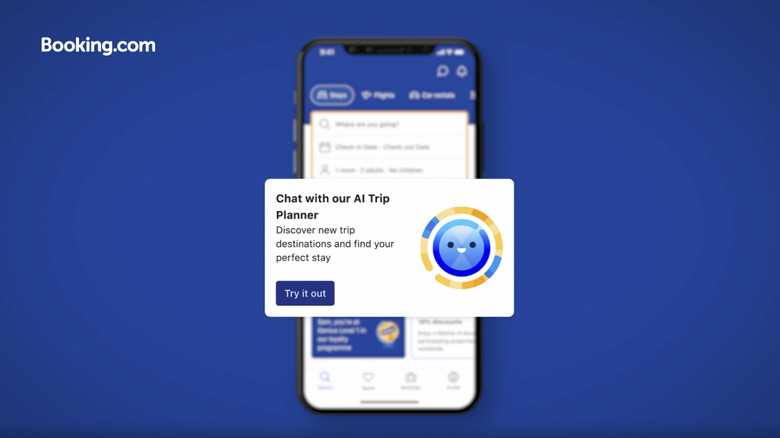
Booking.com's AI Trip Planner draws on the platform's machine-learning models alongside the ChatGPT API. You can ask it endless questions about where to go and what there is to do when you get there, and the more detail you give it, the more detailed its responses are. It even factors in your previous searches and where you've traveled. That said, it isn't the only AI you can use to help you plan the trip of your dreams.
In terms of booking, the AI Trip Planner also offers Property Q&A. This lets you input direct questions about the specific property you're looking at. CNET says it's "by far the coolest feature" and that "you can get really granular with your search." So you should be able to find out if the hotel sits in a walkable neighborhood, in the proximity of a busy road, or if the management's idea of a sea view involves binoculars. It gets its answers from a combination of sources, including the property page and what past guests have said.
It's also important to note that AI can make mistakes, so you should make sure to do your due diligence if you use it. On top of the AI Trip Planner, Booking.com has a separate AI tool called Smart Filter. With it, you can type in exactly what you want your property to be like before letting the platform work its magic.
Don't trust star ratings or the default listing order

Hotels earn their star ratings in different ways. Some receive them from a local authority or an outside organization; others set their own. In fact, only a few hotel awards and certifications actually matter — but Booking.com takes a hotel's star rating at face value. While the platform does say that it will look into "inaccurate" star ratings, it admits that it doesn't actually review them itself. This means that misleading star ratings may remain unchallenged, and some properties can end up being a disappointment despite a healthy star rating.
You might also expect the hotels at the top of Booking.com's listings to be at least among the best, but this is also misleading. By default, the list of hotels is set to what the website calls "Our top picks" (or "Popularity" on the app). But the reality is that the property's ranking is tied to how much commission it has paid the website and whether it has enrolled in the Preferred Partner Program.
You can combat this by changing how the list is sorted. You can sort by price, review rating, Genius discounts, and more. "Top reviewed" is a particularly useful way to sort the list. In that ranking, the volume of reviews counts alongside the overall score. This means hotels that are rated an eight with just a few reviews sit below lower-rated properties with numerous reviews. This helps reduce the influence of any potentially fraudulent reviews while also giving a larger, more reliable opinion pool.
You can also apply filters so that only hotels with exactly the features that you want are displayed. Set your minimum review score preference and desired price range first, then filter for results for free cancellation, property type, bed size, room facilities, and many other options. You'll also get a number indicating exactly how many properties with your specific requirements are available.
Know how to get the most out of reviews

Before skimming over the first few customer reviews on Booking.com and making a hasty decision, look a little deeper. The website defaults to the reviews it perceives as "most relevant," but there is a lot more to discover. First, you can flip the order. Changing it to sort by the lowest scores first can reveal repeated complaints like uncomfortable beds or street noise. A keyword search can also reveal how common those complaints are. Search for what matters most to you, like "Wi-Fi" or "bed," to see what guests have been saying. It also helps to order the reviews by newest. This can show if things like construction noise are still an issue.
It also helps to think about who is leaving the review. A 2025 study shows a traveler's home culture shapes what appeals to them most and how generous they are with ratings. For example, Western travelers are more likely to give a higher score on comfort if the bed is soft, while people from some Asian cultures are more likely to prefer a firm or even hard mattress, and some may even have a higher tolerance of street noise. Looking for reviewers marked as the same country or similar culture to yours may reveal information more useful for you.
One thing where Booking.com shines over open travel websites like Tripadvisor or Yelp is that only people who have actually booked through the platform can leave a review. This means fake reviews are not as big an issue as they are on other sites. Still, you might want to check them to get unfiltered photos of your potential room before confirming your booking.
Cross-check properties that have few reviews

As discussed, only accepting reviews from people who have confirmed stays gives Booking.com a real edge over open platforms. However, even that protection has limits, especially when review numbers are in the single digits. Research comparing Booking.com with Tripadvisor found that scores are most vulnerable to manipulation when review counts are low. Even with Booking.com's safeguarding, a new but low-quality hotel looking for a positive kickstart on Booking can simply ask friends or family to reserve a room and leave flattering write-ups. However, many new hotels without reviews do indeed offer excellent rooms — and they might even offer them at excellent rates in order to attract those verified customers and the reviews that come with them. Therefore, it can be difficult to judge if a new listing is trying to game the system or honestly build a solid reputation.
If you prefer to rely on verified stays, a good idea is to look for hotels with at least 40 to 50 reviews. Below that, it can be hard to see where a property truly shines and where it struggles. If the hotel has just a few reviews and you're prepared to take the risk, you could check those open platforms where they might have a high number of write-ups. But remember to treat them with caution. Tripadvisor is well aware that some hotel owners reward guests with perks like a free meal or a room upgrade in return for a positive write-up. So learn the right way to read hotel reviews if you don't want to be misled before confirming any booking.
Research the neighborhood before booking
Choosing the wrong location is one of the most common mistakes you'll want to avoid when booking a trip on Booking.com. It's likely you'll want to stay in a neighborhood with plenty of walkable areas, transport links, places to eat, shopping, and maybe even a bar or two. Central areas and tourist districts are where you can get these. With well-lit streets and plenty of people, they usually feel safer, too. Still, it can be worth looking beyond these centers. Stepping a little further out can pay off, as long as you have solid transport services and a few eateries nearby. That said, properties further afield sometimes open up after-dark issues, so it's best to find out how safe the streets are at night. Reviews on Booking.com or Google will reveal plenty, while the U.S. Department of State sometimes offers advice on districts where crime is high.
Once you have a shortlist of potential stays from Booking.com, check their location on a map. Booking.com does have its own, but it generally just shows where properties are and has limited info on what's available in the area. Instead, you can find your potential hotel on Google Maps. Locate it and type "restaurants" in the search bar, and it will show you all the listed options around the property. You can do the same for bars, bus stops, subway stations, or whatever you need. You might want to check how far your hotel is from a landmark you're interested in visiting or if the train station you'll be arriving at is in the vicinity. For this, just click on "directions" on the hotel information panel. Then type in the landmark or station in the search bar or click it on the map, and it'll tell you how long the walk or drive is.
Ignore Only X rooms left! warnings

Popularity and availability messages are often used by booking platforms to create urgency. On any booking site, you should largely ignore remarks on the number of rooms available, deals about to expire, or the number of people looking at a room now. The U.K. has already acted on things like this. The Consumer Protection from Unfair Trading Regulations 2008 bans traders from falsely claiming an offer is only available briefly. In 2017, the Competition and Markets Authority (CMA) investigated hotel booking sites, including Booking.com, "following concerns that some of their practices may breach consumer law." Across the pond in the U.S., a 2022 report by the Federal Trade Commission treats design choices that create false beliefs as a concern and gives "Only 1 left in stock" as an example.
In 2019, Booking.com committed to changing these practices. Which? discovered the site did make some changes, but, in their opinion, it wasn't enough. As recently as May 2025, researchers at Bits of Freedom found Booking.com's browsing pages still using messages like "only 1 room left." They also found that those messages could not be verified. Consumer Reports notes that a "last room" label may refer to the website's actual allocation, and Booking.com now words it as "We have X left." The simplest approach is to ignore these messages. If it turns out to be true and you lose out on a booking, check the hotel's own website for availability — although rates may vary. You could also just book a different hotel or check another booking platform. In short, don't stress.
Consider properties with free cancellation if your plans aren't confirmed
Free cancellation is an invaluable feature if you're not entirely sure about your plans. Booking.com hired the services of the Muppets to let everyone know about it in its 2025 Super Bowl ad. However, as the sarcastic Statler effortlessly clicks cancel on his phone in the ad, the words "check property's cancellation policy before booking" appear in tiny little letters for just a couple of seconds. It's pretty important information, but to read it, you need to hit pause and get the magnifying glass out. TruthInAdvertising.org also shows that Booking.com claims most rooms include free cancellation. In practice, the reality is somewhat different. Each property sets its own deadline, and that deadline varies by rate. The search page shows the date until which canceling is free, but it doesn't show the fee for canceling after that date. The full fee appears later, so it's wise to check before confirming payment.
However, it is undoubtedly an excellent feature. It allows you to lock in a hotel even if your trip is not confirmed or your dates are uncertain. You could even use it to cancel if something like a hurricane hits your destination, the gig you are going to gets canceled, or you are refused a visa for whatever reason. You can conveniently filter for free cancellation when searching for properties if you want this option included in all your property considerations. Partially refundable and non-refundable rates are also options and are often discounted. But if you choose one of those, make sure your plans are concrete.
Check for price matches and mobile-only deals before booking
Not many people know that Booking.com actually refunds the difference in price if you find your already confirmed booking elsewhere for less. That cheaper offer has to match your Booking.com reservation for the same hotel (obviously), the same room, the same dates, the same cancellation rules, and the same number of guests. It also has to include the same meals or add-ons, and its price has to be in the currency the hotel uses. Additionally, you can't claim on a Partner Offer, which is a deal Booking.com gets from a partner company rather than the hotel itself. The lower price also can't be dependent on a loyalty scheme or coupon offer, and it must also still be live when Booking.com checks it.
So, if you check all those boxes, Booking.com should then confirm a refund for the difference, but the final call is theirs. To claim a price match refund, scan your booking confirmation page for "Found this room cheaper elsewhere?" and click. Paste the link to the cheaper offer along with screenshots showing the necessary details, then contact customer service.
Mobile-only deals are absolutely worth a look, too. Booking.com has discounts that only appear when booking on the mobile app. Which? performed a spot check of 50 listings and found that 15 of them were cheaper on the mobile app. You'll still get your Genius savings on top, too, so always compare prices between your laptop and phone before booking.
Use your own tricks to save even more
The price you see on Booking.com isn't always the final word. Armed with a few extra tricks up your sleeve, you can shave even more off your bill. Start with your phone. Which? quoted 10 hotels in the U.K. the cheapest rates they had found on booking sites, and exactly half of them at least matched the prices. However, they also found Booking.com was the only site where that rate was "consistently cheaper than booking directly with the hotel." But you can still call the hotel to check. Surprisingly, Booking.com says exactly the same thing in an article on its website. It describes how a quick call directly to a hotel can pay off, with independent hotels, in particular, ready to deliver a better rate. The same article describes how having flexible dates when booking a room can open up savings, while searching for a room 24 to 72 hours before your arrival can also land good deals.
However, your location can affect the online price. While Booking.com says hotels set their own rates, SFGate found people in the Bay Area were being charged more than users from other cities by online booking platforms. Connecting a VPN to different cities may well turn up some surprising prices. A simple (and free) Chrome browser extension can also help out. RatePunk compares prices for the same hotel you're looking at across popular booking platforms. It shows results for the same dates, and it can also track price changes. This can be particularly useful if you've taken advantage of Booking.com's free cancellation feature. When you get a price-drop alert, cancel and rebook your room. And with that, here are even more hacks and perks that can make any hotel stay more comfortable.