
9 High-Tech Items Digital Nomads Should Never Leave Behind When Traveling For Remote Work
We may receive a commission on purchases made from links.
From campsites to hotel desks to co-working spaces around the world, digital nomadism is now firmly a mainstream phenomenon. Thanks to connectivity in more places than ever — as well as WiFi signals and cellular data speeds that keep getting faster and more reliable — options for remote working continue to expand. Increasingly, countries are also considering more flexible ways to welcome those employed elsewhere, including offering 12-month visas to remote workers.
Whether you're thinking about switching up your career path and adding more travel in your routine or you're interested in finding ways to optimize how you already work, there are always new gadgets and tools designed to make life easier. If you're fresh to the whole idea, among the tips and tricks no one tells you about being a digital nomad is the importance of balancing practicality with convenience. I've experienced working remotely during both international trips and domestic jaunts that last from a few days to several months at a time. And aside from the practicalities of travel, the very first things we think about are tech-related. Sure, we need our computers and our phones, but what about keeping them charged? How do we keep my documents secure? How do we stay connected in remote places? What happens if we lose something?
Depending on how and where you travel, you'll require different tools. Some of the nine high-tech items listed below are great to have whether you're just popping over to your local coffee shop or working on a train, such as earbuds or an ergonomic keyboard, but others may be extra beneficial for international trips, such as a real-time digital translator and high-capacity power adapters. Read on for some of the best options out there for high-performance gadgets to streamline your nomadic work life.
Noise-canceling earbuds
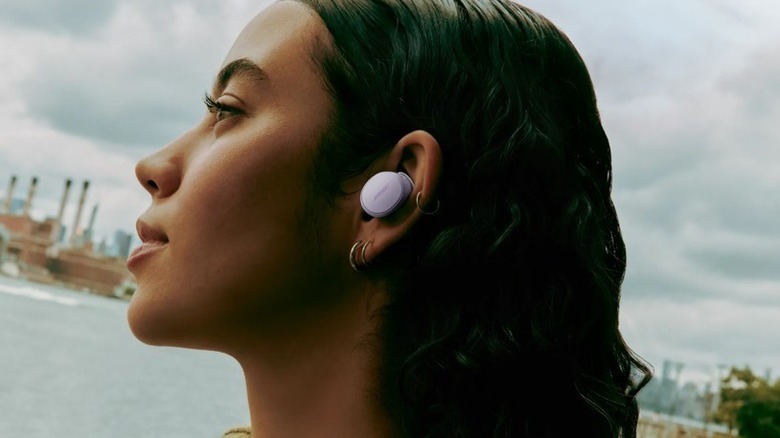
There's an almost overwhelming number of types of earbuds and headphones on the market to choose from today. Wired or wireless? Apple or Android? In any case, a good noise-canceling feature — on either earbuds or over-ear headphones — is ideal for being able to concentrate on your work no matter what kinds of distractions may emerge.
Bose QuietComfort Ultra Earbuds (2nd Generation) have been rated the best noise-canceling earbuds by CNN Underscored for 2026. I've used Bose headphones and earbuds for years, and it's almost uncanny how effective the company's ActiveSense feature is. Even in a kind of noise-cancelation "lite" setting called Aware Mode, if there's a big sound or disruption, it's dampened. QuietComfort Earbuds also come with a proprietary technology that Bose calls CustomTune, thanks to an in-house aerospace engineer, which customizes the sound quality and noise cancellation to the wearer's specific ear shape. Algorithms analyze a little "thwomp" chime that travels through your ears when you first turn on the earbuds to enhance your listening experience. And in case you need to make calls, there's also a high quality mic.
Apple AirPods are a popular choice for iPhone and Mac users, and the AirPods Pro 3 come with built-in silicone ear fittings that help to block out ambient sounds, in addition to Apple's Active Noise Cancellation feature. Now, you don't have to invest quite so much in the Pro series, as Active Noise Cancellation has rolled out with the standard AirPods 4, which is great if you prefer a no-silicone fitting. With the Pro 3, though, you also have the spiffy option of live language translation, enabled with AI. For non-Apple users, Sony LinkBuds S are a great alternative, and they even have Amazon's Alexa built in.
Bluetooth trackers
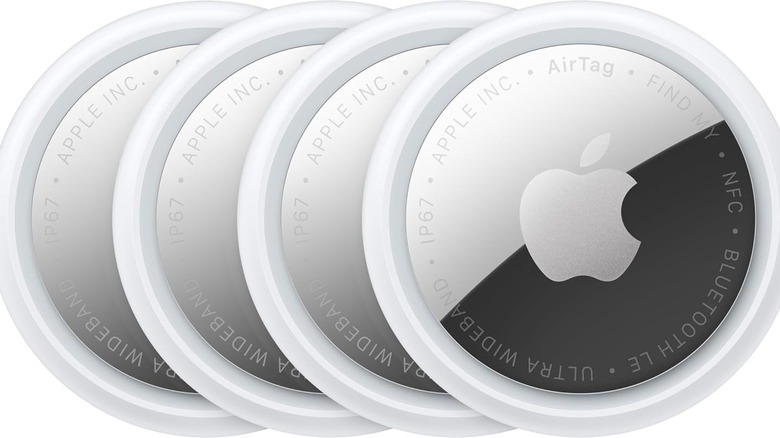
If you're the type of person who has a hard time keeping track of your keys or other belongings on a normal day, let alone when you're traveling or a pickpocket steals from your purse, a Bluetooth tracker might be just the ticket to finding it again. Pop one in your wallet, stick it to your phone or laptop, attach it to your keys, or slide it into a pocket of your tote bag or backpack.
Bluetooth trackers work by connecting to an app on your devices, such as Apple's Find My app. Apple's version of the tracker is known as the AirTag, which can be purchased in packs of multiples. The 2nd Generation version holds its battery power for at least a year, so you don't need to worry about recharging all the time. Not only can you spot the location of the tag on your app, it also makes a chime, so you can locate it by sound. For added peace of mind, Apple AirTags also have the capacity to share location information with contacts and even dozens of airlines Apple has partnered with.
There are numerous other Bluetooth tracker devices you can use to fit the space or item you're concerned about. The Life360 Tile Slim, for example, is compatible with both iOS and Android devices and is shaped like a credit card. It can fit in a narrow space and detect a location within 350 feet. The company's Tile Pro can be detected within a 500-foot range and also has a loud ringing sound when activated. Since Bluetooth is typically optimal up to 300 feet or so, according to Intel, being able to detect farther illustrates how this tech keeps getting better.
High-mAh power bank
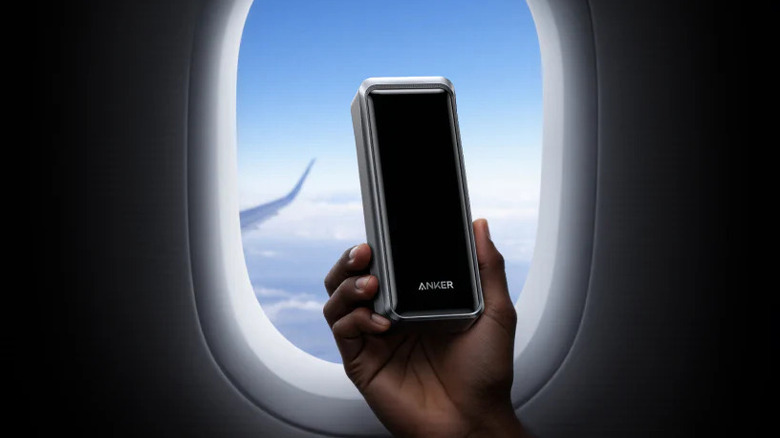
When it comes to being able to work while on the move, which is essentially the raison d'être of digital nomadism, keeping devices charged is a big deal — it might even be the most important thing. After all, if your laptop or phone dies and there's nowhere to plug it in... then what? That's where the mighty power bank comes in. No matter if you're traveling abroad or heading out on a historic American cross-country road trip, it's always a good idea to have a charged-up battery (or two or three) at the ready.
Not all portable batteries are created equal. Some are powerful and perfect for plugging in all sorts of accessories, but they can be very heavy — here's looking at you, bulky power stations. That said, while a good one like the Jackery Explorer 300 is useful, unless you're a vanlifer, you probably don't typically need something that bulky. Power banks, on the other hand, are generally smaller and much more portable, and they can save the day in a pinch. The TSA-approved Anker Prime Power Bank is a solid choice for charging laptops and phones, with both USB-A and USB-C connections. At 26,250mAh — mAh stands for milliamp hours, which is a measurement of the electrical charge of a battery — Anker's model has enough juice to nearly fully charge a MacBook Pro once. You can also charge multiple devices simultaneously. Another comparable, more budget-friendly bank is the Cuktech 15 Ultra at 20,000mAh.
If you're more concerned about your phone, there are numerous options to choose from. Nimble's CHAMP Portable Charger provides 10,000mAh and was rated the best choice for a stylish bank in 2026 by PC Mag. It'll recharge a smartphone halfway, from zero battery, in about 30 minutes.
Portable wireless keyboard and mouse
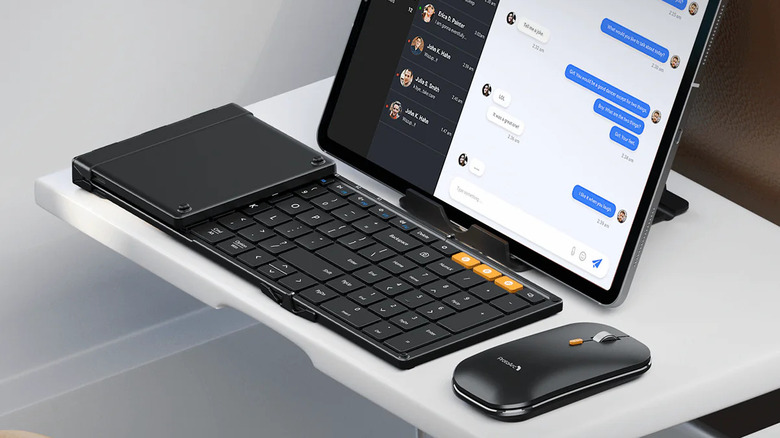
As nimble as it is to use a laptop with its — usually compact — built-in touchpad and keyboard, sometimes we need something closer to a standard desktop size or one that's more ergonomic. Wireless keyboards have been around for a while now, and not only has battery life has improved over the years, but there are numerous configurations to choose from depending on your preferences. Apple, for instance, makes its Magic Keyboard at full-size with the option for a numeric keypad included or just the alphabet. If you're happy to spend a little bit more, you can also find them with Touch ID, which enables you to log onto services and make purchases by using just your fingerprint. The Magic Mouse is sold separately.
Although they're easily portable, and the battery life is about a month before you need to recharge, one drawback of Apple's keyboard options is that they're a little clunky to carry around and often hard to fit safely into luggage. ProtoArc has a line of tri-fold keyboards, like the XK series, which is designed for business on the move. It has an auto-sleep mode that keeps the battery charged for a few months, in case you just use it as a backup sometimes, and it can quickly switch between up to three different devices. The XKM01, for example, is also sold in a combo pack with an ultra-slim optical mouse and a carrying case. And the XKM03 is a bi-fold ergonomic option to maintain a more natural position for your wrists while you type.
eSIM

Gone are the days of sitting on an airplane, having to switch between one physical SIM card and another, all the while worrying about it falling on the floor or between the seats, never to be seen again. Thankfully, eSIMs take that concern out of the equation and enable you to have data — and your own hotspot — virtually anywhere. If you typically travel around the U.S., you may have never used an eSIM, but chances are, your phone is already set up for it. It's essentially a digital, embedded — that's what the "e" stands for — version of a SIM card.
Compatible phones, according to Holafly, include the iPhone XR/XS and after, the Samsung Galaxy S20 and later generations, the Google Pixel 2 and after, and many others. iPhones actually have a feature called Dual SIM, which means you can use different numbers on the same phone. Depending on your carrier, the iPhone 17 Pro can store eight or more eSIMs.
These eSIMs also enable you to add a data-only plan for use when you're traveling abroad. Service is typically purchased for a set number of days, depending on how long you'll be visiting a place, and the price varies depending on your destination. Holafly, for example, offers eSIM options for unlimited data in dozens of countries around the world. Jetpac is another option that offers data in more than 200 countries, and one perk is that even if your data runs out, you'll still have access to important apps like WhatsApp, Google Maps, and Uber. Saily was also rated highest by Cybernews for its value, security, and customer support. There are numerous other options out there, but if you plan to go abroad, make sure you're purchasing an international data eSIM that is compatible where you're planning to travel.
Digital translator
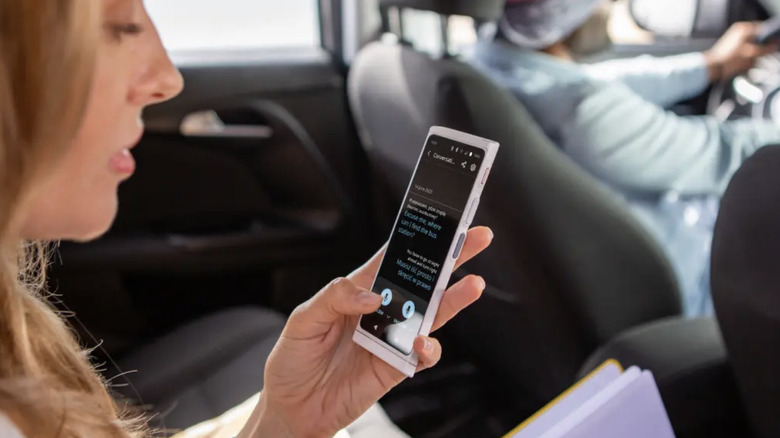
While it's pretty cool that Apple's AirPods Pro 3 come with AI-enabled language translation built-in, what happens when you're actually just trying to talk to someone face-to-face and there's a language barrier? That's where a powerful digital translator comes in. Travel+Leisure rated the Vasco V4 their overall pick for 2026, largely thanks to its lifetime internet access and ability to automatically detect and translate 112 languages. This may not be something everyone needs, but if you work internationally often and find yourself in situations that require you to comprehend other languages, it can make life a lot easier.
The only major drawback to the Vasco V4 is its price, which is $449 as of this writing, but it also comes with a language learning app and the ability to have a multi-lingual chat. For a much more compact and budget-friendly option, albeit with a smaller number of features, the Vital Translation Earbuds are less than $40 and have 74 languages — and 70 accents — pre-programmed for processing in real time. Since you wear them, you don't have to worry about holding a separate device.
But if adding a whole new digital item to your lineup isn't something you'd prefer to do, there are still quite a few hidden Google Translate features every traveler should know, such as being able to download some languages and automatically translating text by hovering your camera over foreign languages, such as menus or street signs. It also features a live conversation feature, which automatically transcribes spoken language into text. Some pairings aren't yet available, but you'll find live conversational translations for Punjabi, Korean, Afrikaans, many European languages, and many more.
High-performance external hard drive
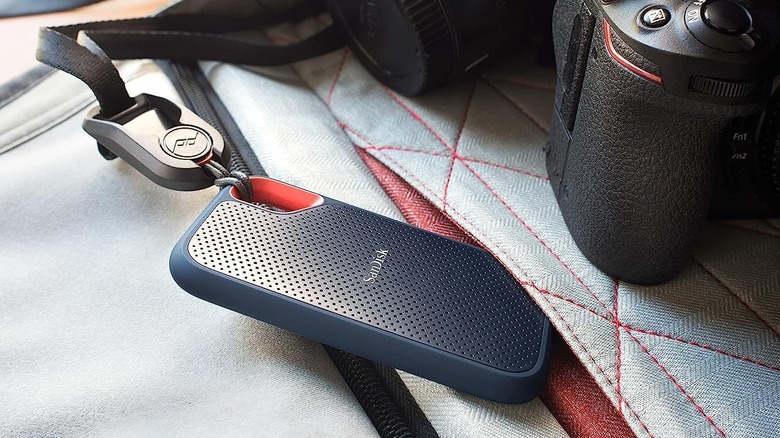
In addition to all of your vacation memories being kept safe on an external hard drive, it's no small thing to make sure your documents and media have an extra layer of security in case the worst happens. After all, accidents happen and we've all experienced the shock and horror of dropping (and breaking) a device, spilling liquids, or other mishaps. Without an external drive — sometimes referred to as an SSD, or Solid-State Drive — everything might be lost in these scenarios. With that in mind, one non-negotiable for digital nomads should be keeping all of your information backed up and secure. Consider it like having a compact hardware insurance policy. And it's a great practice to pair SSD backups with virtual services such as Apple's iCloud or Google Cloud for extra peace of mind.
How much space do you really need? One terabyte (1 TB) is typically enough for most users, according to Coolblue, but if you store a lot of media, larger may be better. The price will range accordingly. The Crucial X6 4 TB Portable Solid State Drive's capacity is pretty big, as its name suggests, with the ability to hold thousands of photos and hundreds of gigabytes of documents. The cost is congruent with its power at $400, but if you don't need that much space, SanDisk's 1TB Extreme PRO Portable SSD was rated the fastest by The Strategist, which relies on speedy USB-C charging and boasts a small, portable size. You can also purchase that one in incrementally larger versions, too, including a massive 8 TB model, which as of this writing is a little more than $900. Crucial's X10 8 TB Portable SSD is a little more affordable at just under $800.
Universal travel adapter with USB ports
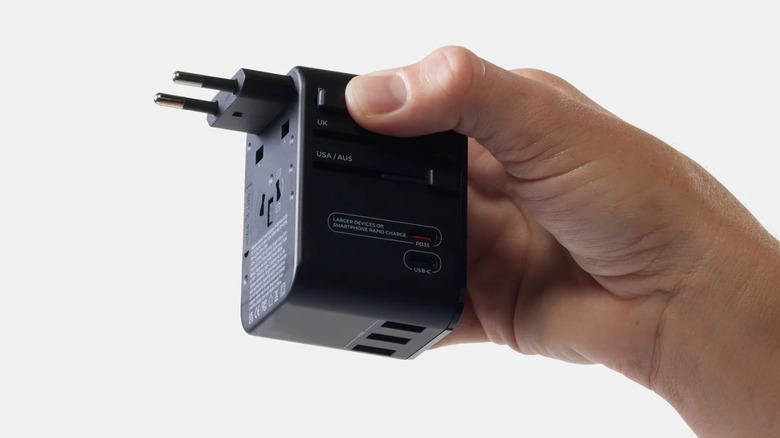
One of the first things international travelers think about is how to power their devices or accessories when they get where they're going, as different regions use different voltages and outlet styles. Depending on where you go, you may need a converter, such as the BESTEK Universal Travel Adapter 220V to 110V Voltage Converter, but these typically aren't as much of an issue when it comes to charging today's technology, which are designed for dual voltage. Look for "110-220V" labeled somewhere on your device, which denotes it's fine to use without a converter in both the U.S. and Europe. On the other hand, you'll definitely need an adapter.
Rather than dealing with numerous little pieces that clip together, a universal adapter like the Matador Global Travel Adapter is an all-in-one option that works in more than 170 countries and has a total of five USB ports — three USB-A, a standard USB-C, and a high-capacity USB-C. The plug adapters pop in and out via the use of simple switches, so you don't have to worry about misplacing parts.
The Anker Nano Travel Adapter is even smaller, with the same number of USB ports, plus it has a temperature control to avoid overheating. And if four ports just doesn't cut it, invest in a high-capacity model like the Momax 9-in-1 High-Power Universal Travel Adapter, which features a whopping six USB-C ports, one USB-A, and dual AC output. Momax incorporates Gallium Nitride (GaN) technology for optimized charging, so you can have several devices plugged in at once without slowing things down.
Cellular signal booster
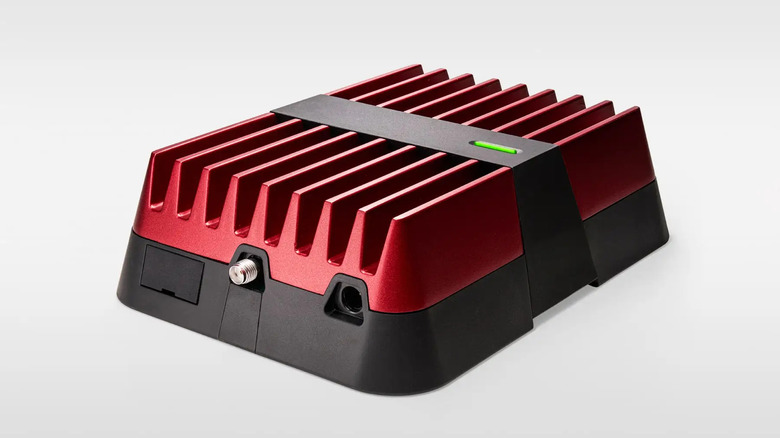
While there are plenty of gadgets for those who travel internationally, for those of us who spend a lot of time on the road around the U.S., staying connected can present its own challenges. Cities are typically full of coffee shops, cafes, libraries, hotels, and cooperative workspaces where WiFi is easy to find, but in out-of-the-way areas — the beach, campgrounds, or small towns — connectivity can feel like a crapshoot. Rick Steves has some tips for using data roaming safely and wisely, but sometimes it's just a matter of making sure you have reliable data in the first place. For overlanders and vanlifers, a signal booster is a great way to increase your chances of reliable internet if you often use your cellular network as a hotspot.
A booster like the WeBoost Drive Reach Overland attaches to your vehicle like an antenna, and the cellular signal is amplified up to 32 times — the maximum extent allowed by the FCC. An exterior antenna is linked to an interior antenna by way of booster hardware installed between the two. With the ability to reach cell towers that are father away than your phone typically pings on its own, it's an option for getting a stronger hotspot in remote places without having to pay a monthly subscription fee, such as for internet-only services like Starlink. Of course, it doesn't hurt to combine the two if you need a guaranteed connection in one way or another, but weBoost is generally more affordable with its one-time setup cost of $550, as of this writing. Refurbished models are also an option at a discount of about 20%.
Methodology

In addition to the author's personal experience as a remote worker who travels frequently both domestically and abroad and regularly uses tools similar to — or the same as — the ones listed here, we compiled this list with the assistance of gadget roundups on sites such as Travel+Leisure, CNN Underscored, The Strategist by New York Magazine, The New York Times' Wirecutter, Cybernews, and PC Mag. Additional information came from RickSteves.com, and individual companies' official websites and product descriptions on Amazon provided service information and model specifications.